
Date stamp · orange digits
A date stamp camera app with the 90s orange digits.
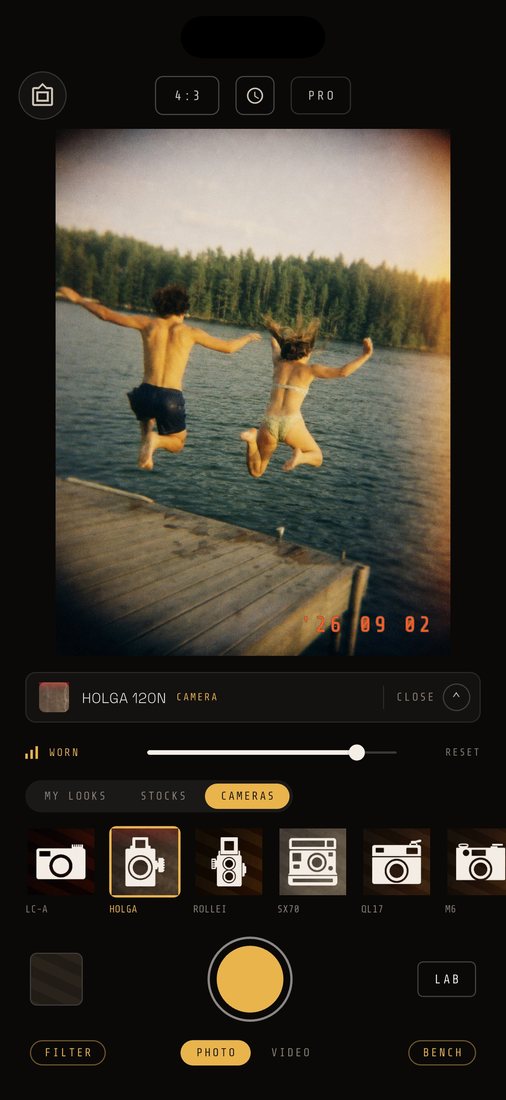
CAM135 puts the date in the corner of your photo in orange LED digits, the way a 90s point-and-shoot did. iPhone and Android.
Plainly: it is the date only, from your phone's clock. No time of day, no location. On a photo the stamp shows in the app. A photo you save or send is clean, unless you print it with a DATE BACK frame. Video carries the stamp in the file.
Date stamp always free · 6 faces · 7 layouts · iOS 15+ · Android 7+
01How it works
How the date stamp camera app works
The stamp is on from the first launch. You do not set it up. You shoot.
The DATE switch sits on the viewfinder glass. With it on, every photo gets your phone's date at the moment of the shutter, in the corner of the picture. Your photos in the app, and the full-screen viewer, draw it over the photo. Tap the switch off and new photos carry no stamp.
It is not read off the photo, and it is not typed in. It is today's date from the phone, written once when you press the shutter. Change the face or the layout later and the photos you already took keep the ones they were shot with.
- 01Open CAM135. DATE is already on.
- 02Shoot.
- 03Open your photos in the app. The date sits in the corner of the photo.
02The DATE STAMP sheet
Six faces, seven layouts
A stamp is two choices: what it says, and what it is lettered in. They are picked separately.
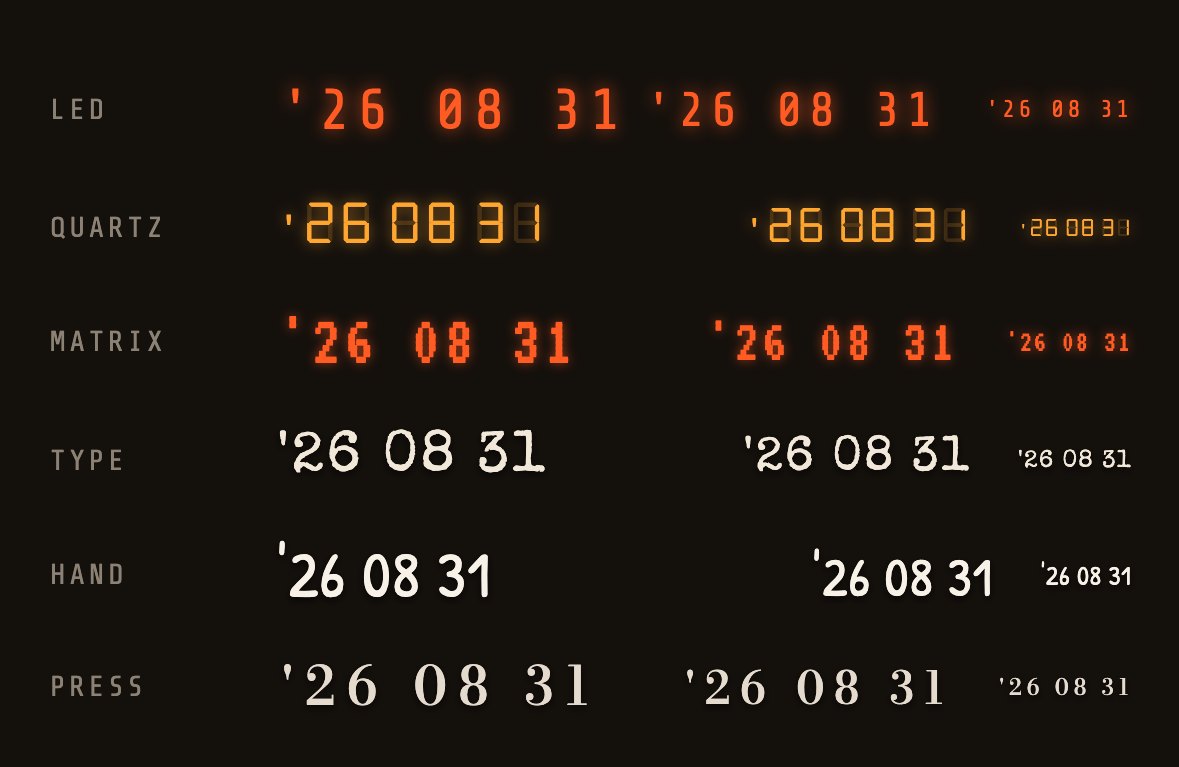
- LED
- The orange readout, glow and all. The default.
- QUARTZ
- Seven amber segments, the unlit ones still faintly showing.
- MATRIX
- Orange dot-matrix, printed on by the camera back.
- TYPE
- Typed on, the way the back of a print is.
- HAND
- Handwriting, the same hand a frame is captioned in.
- PRESS
- Set in serif and letter-spaced, like a caption under a plate.
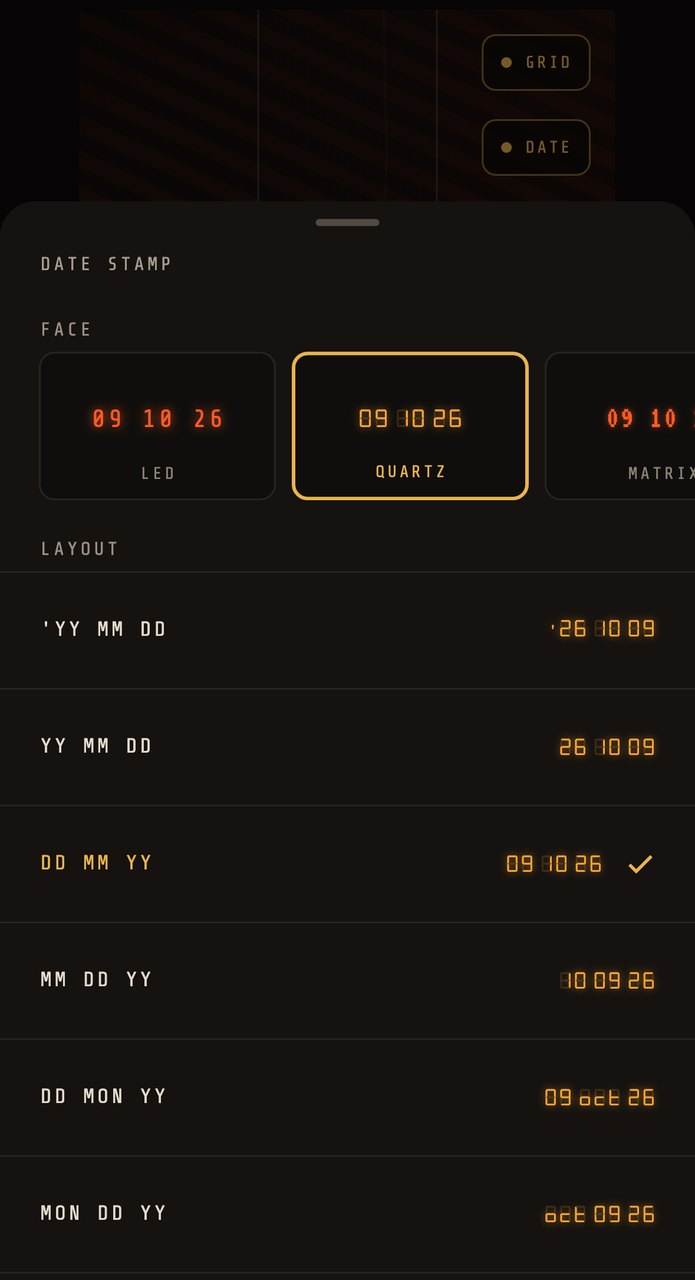
Tap the clock button at the top of the viewfinder to open the sheet. The layouts are
'YY MM DD · YY MM DD · DD MM YY · MM DD YY · DD MON YY · MON DD YY · YYYY MM DD
and the first one, '26 08 22, is the default.
REFERENCE RENDERS FROM THE APP'S OWN CODE · DATE SHOWN: 31 AUG 2026
03Pairing
Which cameras suit a date stamp
The stamp works with every still camera and every film. These are the ones that look right with it.
 '98 08 14
ILLUSTRATION · THE STAMP IS DRAWN BY THIS SITE; IN THE APP A STILL SHOWS THE DATE WHEN YOU VIEW IT, NOT IN THE SAVED FILE
The Fuji QuickSnap and the Olympus Pen EE feel right with a date in the corner, and so do the Canon AE-1 and the Canonet QL17. Kodak Gold 200 and Fuji Superia 400 are the films most people reach for. That is taste, not history. Pick what you like. If you want the whole disposable look around the date, the disposable camera app page covers it, and the retro camera app page goes decade by decade.
04In the picture
Keep the date in the picture
A still's stamp is drawn over the photo in the app. To send the date inside the picture, print it with a DATE BACK frame.
- 01Open the Camera Roll and tap FRAME.
- 02Pick one photo you shot in the app.
- 03Choose DATE BACK, DATE BACK · SOFT or TIMECODE.
- 04Tap the DATE chip. It drops in the date the photo was shot, and it only appears for photos shot with DATE on.
- 05Tap APPLY. A new print is added to your photos in the app, and the original stays as it was.
- 06Save or share the print. The date is in its pixels.
The date lands low in the picture, in the bottom corner: orange LED on the two DATE BACK frames, white mono on TIMECODE. You do this one photo at a time. It is not automatic.
Video is the other way round. The stamp goes into the file by itself, in the face you chose. The VHS look prints its own clock over the date.
05Your call
Turn it off, or change it
The DATE switch turns the stamp off. The clock button changes the face and the layout. Both apply to the next photo you take. Photos you already shot keep the stamp they were shot with.
06Plainly
What it does not do
- It does not add a location. There is no GPS in the app.
- It does not put a time of day on a photo. The Info sheet in the app shows when each photo was shot. That is not printed on the picture.
- It is not verified. It is your phone's clock, which you can change.
- It cannot stamp photos you already have. It stamps what you shoot in the app.
If you need a time of day or a record for work, read the time stamp camera app page first. For phone-by-phone steps, see the date stamp on iPhone and Android page.
07Price
The date stamp is free. Always.
The first 30 photos and videos come with everything unlocked. After that, 3 films and 3 cameras stay free. $19.99 once unlocks the rest. $7.99 / month adds cloud backup. No watermark, no ads.
Questions
The short answers.
- What is a date stamp camera app?
- An app that prints the date on your pictures. CAM135 prints it as a film-style date, '26 08 22 by default, in orange LED digits, with six faces and seven layouts to choose from.
- Does the date stamp show the time?
- Not on photos: the stamp is the date only. Video is different. The VHS look prints a 12-hour clock above the date, and the seven camcorders print the date in the face you chose.
- Is the date stamp part of the saved photo?
- In CAM135's Camera Roll and viewer, you see it. A photo you save to Photos or share is the clean image, so the stamp is not in it. To put the date into the picture, print it with a DATE BACK frame from the Camera Roll. Video is stamped into the file.
- Can I add a date stamp to photos I already took?
- No. CAM135 stamps what you shoot in the app. Photos you bring in for the film filter carry no date.
- Can I turn the date stamp off?
- Yes, with the DATE switch on the viewfinder. It changes new photos only. Photos you already shot keep the stamp they were shot with.
- Is the date stamp free?
- Yes, always. The first 30 photos and videos also unlock everything. After that 3 films and 3 cameras stay free, and $19.99 once unlocks the rest. There is no watermark and no ads.