
iPhone and Android · photo time stamp
iPhone photo time stamp: what your phone shows, and what an app prints.
An iPhone photo's time stamp is information saved with the photo. Open it in Photos and swipe up to see when it was taken.
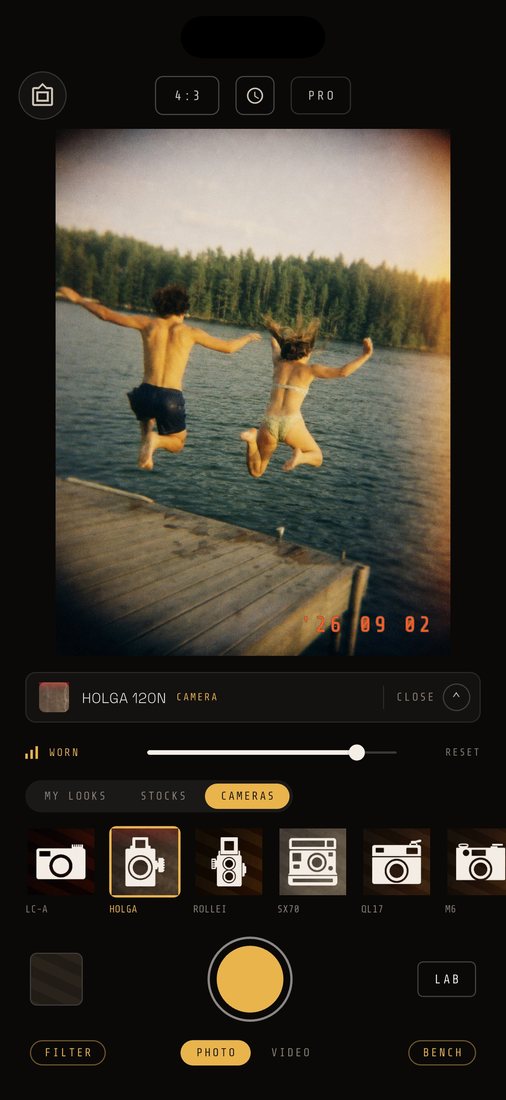
It is not printed on the picture, and we found no iPhone Camera setting that prints it. CAM135 shows a film-style date over the photos you shoot in it, on iPhone and Android. The date shows in the app; a photo you save or share is clean unless you print it with a DATE BACK frame first. Just the date: no clock time, no place.
Date stamp always free · iOS 15+ · Android 7+
01Your iPhone already has one
See the time stamp on an iPhone photo
It lives in the photo's information, and Photos will show it.
- 01Open the Photos app and tap the photo.
- 02Swipe up, or tap the Info button.
- 03Read the date and time the photo was taken, the device that captured it, and camera details like lens and shutter speed.
Per Apple Support, you can change that date and time with Adjust, and Revert puts the original back. Either way it is saved information. It is not printed on the picture.
We did not find a setting in the iPhone Camera that prints a date on new photos. Apple's guide only describes the date as saved information.
CHECKED AGAINST APPLE SUPPORT ON 9 OCTOBER 2026
02CAM135 on iPhone
Put a date on the picture as you shoot on iPhone
A film-style date, in the corner, on the photos you shoot in the app.
- 01Open CAM135. The DATE switch on the viewfinder is on by default.
- 02Tap the clock button at the top to choose a face and a layout.
- 03Shoot.
- 04Open your photos in the app. The date sits in the corner of the photo.
The stamp is your phone's date at the shutter: date only, no time of day, no location. There are six faces and seven layouts. The date stamp camera app page shows them all. Change the face or layout and only new photos follow.
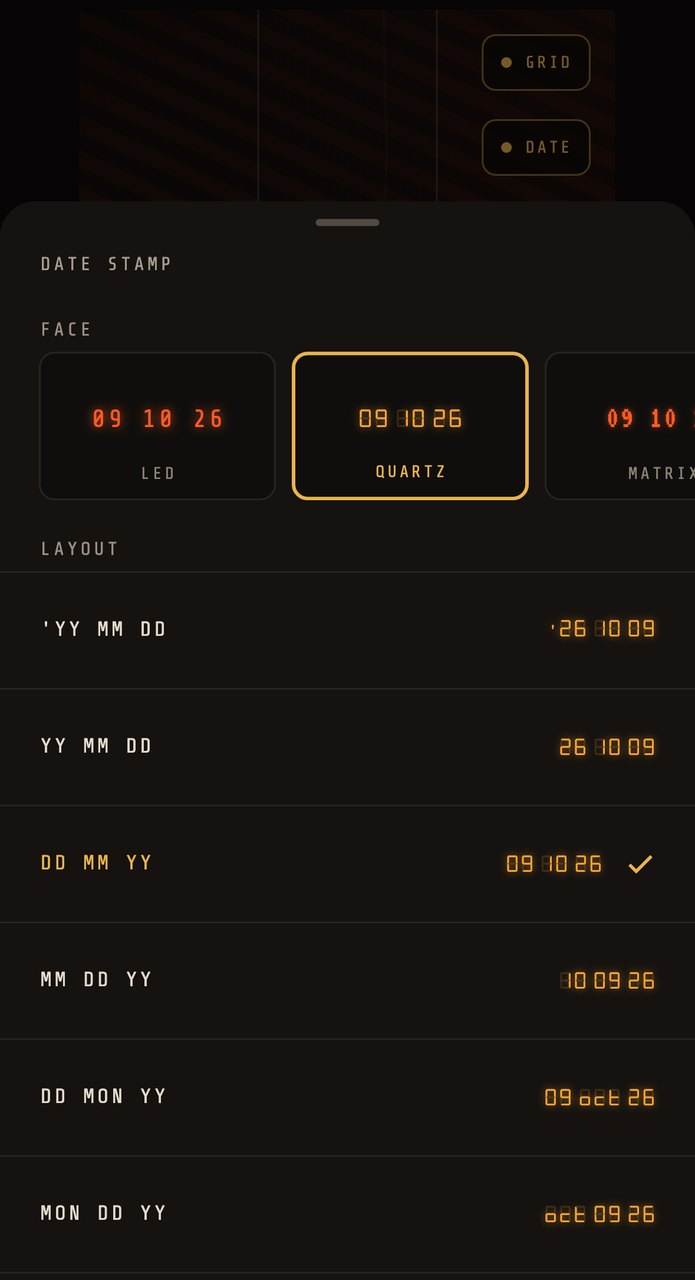
THE DATE STAMP SHEET · RENDERED BY THE APP'S OWN CODE · THE SAME ON IPHONE AND ANDROID
03Android
Android: the same app, the same date stamp
The steps do not change. Only the phone's own option does.

Some Android phones print a date themselves. Per Samsung Support (Samsung support, English) , on a Galaxy phone you open Camera, tap the gear, turn on Watermark, then turn on Date and time. It applies to photos taken after you switch it on, and it depends on your device and software version. On other phones, look in your camera settings.
For a film-style date on any Android 7.0+ phone, shoot in CAM135 with DATE on. It is the same app, the same steps and the same price as on iPhone. See the vintage camera app for Android page for the rest of it.
CHECKED AGAINST SAMSUNG SUPPORT ON 9 OCTOBER 2026
04In the picture
Keep the date inside a saved photo
A still's stamp is drawn over the photo in the app. To save the date inside the picture, print it with a DATE BACK frame.
Open a photo you shot in the app, tap FRAME in the Camera Roll, pick DATE BACK, DATE BACK · SOFT or TIMECODE, then APPLY. That makes a new print with the date in its pixels and keeps your original. The DATE chip only appears for photos shot with DATE on. The six steps are on the date stamp camera app page.
Video needs none of this: the stamp goes into the file by itself.
05Plainly
What this does not do
- It cannot reach back. Photos from the iPhone Camera, your library or before you installed CAM135 stay as they are.
- It prints no place and no clock time, only the date.
- It is not a record. The date follows your phone's clock.
- A shared still is clean unless you printed a DATE BACK frame first.
If you need the time or a record for work, read the camera app with timestamp page first. For the camera behind the stamp, see the film camera app for iPhone page.
06Price
Free to start, on both phones.
iPhone and Android get the same app at the same price. The first 30 photos and videos come with everything unlocked; then $19.99 once, or $7.99 / month if you want cloud backup. No watermark, no ads.
Questions
The short answers.
- How do I see the time stamp on an iPhone photo?
- Open the photo in Photos, then swipe up or tap the Info button. Per Apple Support, that shows the date and time the photo was taken, and Adjust lets you change it. That time is information saved with the photo. It is not printed on the picture.
- Does the iPhone camera have a date stamp setting?
- We did not find one in Apple's iPhone User Guide, which describes the date as saved information. For a film-style date on the photos you shoot, CAM135 prints one.
- How do I add a date stamp to photos on Android?
- Samsung Galaxy phones have a Watermark setting with Date and time, in the Camera settings, on devices and software versions that offer it. For a film-style date on any Android 7.0+ phone, shoot in CAM135 with the DATE switch on.
- Can CAM135 add a date to photos I already took?
- No. Only photos shot in CAM135 carry a date, and it is taken from your phone at the shutter, not read from a file. Photos from the iPhone Camera, your library or the film filter's batch stay without one.
- Is the date in the photo when I save it to Photos?
- On a still, no. CAM135 shows the date over the photo while you view it in the app, but the file you save to Photos is the clean photo. A DATE BACK frame prints it into a new copy; the steps are on the date stamp camera app page. Video is stamped into the file.
- Does it add the time or the place?
- No. Photos get the date only, from your phone's clock, with no location.