Film looks · iPhone & Android
A vintage camera filter app with one dial from clean to ruined.
CAM135 is a vintage camera filter app for iPhone and Android. Each filter is a named film, 11 in all, and one dial sets how much of it goes over the picture, from CLEAN to RUINED. Use it live in the camera, or print one film onto up to 20 photos from your library. It runs on the phone. The filter never uploads anything; cloud backup, if you buy the monthly plan, is separate.
11 films · dial 0 to 100 · first 30 photos and videos free

PRINTED BY THE APP’S OWN ON-DEVICE RECIPE · REFERENCE PHOTOGRAPH
01Five marks
What a vintage camera filter actually changes.
Five things on the picture itself. Each one has a number behind it, and the dial turns all five.
- Color cast
- Each film tints the whole frame its own way: warm for Gold 200, a cool-to-warm sweep across the frame for CineStill 800T.
- Grain
- A fine speckle over the picture, close to three times as strong at the top of the dial as at 50.
- Lifted blacks
- A little fog is added, so the blacks go milky and the whites stay where they were.
- Dust and scratches
- Specks, light and dark, and a few faint scratches down the frame.
- Dark corners
- Falloff at the edges, from half the film's own up to one and a half times it.
Light leaks are not on the list. They come live, from five of the cameras or from a look you saved yourself, not from the batch filter. See the vintage camera app for the cameras.
02One photo, five settings
The vintage camera look, from CLEAN to RUINED.
The same photo on the same film at dial 0, 25, 50, 75 and 100. The word under the viewfinder changes as you move it.
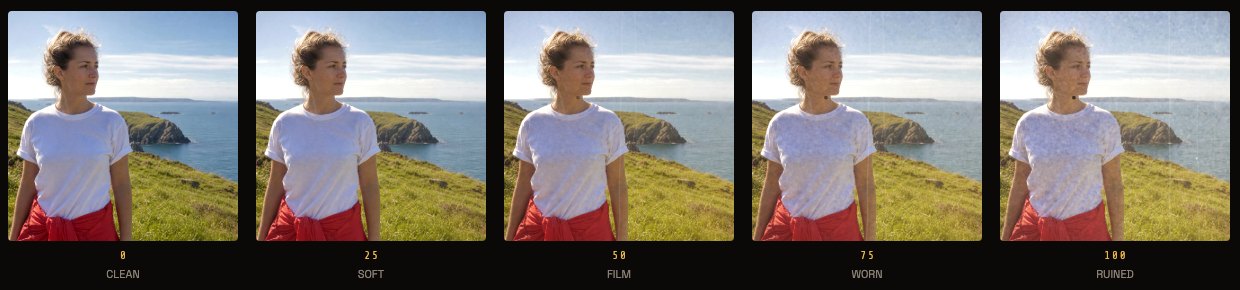
0 · CLEAN
The film's color and contrast, with no grain, cast, fog or dust.
25 · SOFT
Where a fresh install starts. Plainly film, not yet worn.
50 · FILM
The film as written: full grain and cast, a little fog, a couple of faint scratches.
75 · WORN
Milky blacks, thicker grain, dust you can see.
100 · RUINED
The most fog, dust and scratches, and grain nearly three times the film's own.
0311 films
Pick the film, not the preset.
A preset is one look. Here the look is a film, and the dial is how hard it prints.
Portra 160, 400 and 800, Kodak Gold 200, Ektar 100, Fuji Superia 400, Tri-X 400, Ektachrome 64, CineStill 800T, Polaroid SX-70 and the expired Agfa Vista. Same dial on all of them, so you can pick the color first and the wear second. For the 90s flash look, start from the disposable camera app; for a decade, the retro camera app.
04Your library
Put the filter on photos you already have.
Pick up to 20 photos, pick one film, and it prints the look onto each of them.
It runs on the phone, so the filter never uploads anything, and your originals stay where they were. Cloud backup, if you buy the monthly plan, is separate. One film per batch. The prints come out at most 2,048 pixels on the long edge. The Filter screen has no dial of its own: it uses the one on the camera, so set that first (a fresh install sits at 25). You get film color, cast, grain, fog, dust, scratches and dark corners. You do not get light leaks, a date or a frame.
05Old camera filter, old camera effect
Make it look old: fade, dust and expired film.
There is no separate aged switch. Old is the top of the same dial, plus one film.
Turn the dial toward WORN or RUINED and the fog fades the blacks, specks land on the picture, a few faint scratches run down it, the grain thickens and the corners darken. Then pick Agfa Vista, the expired film: faded, muted, with a green-yellow cast. The Holga 120N adds its own fade and a red light leak when you shoot with it.
It ages photos. It does not restore them: a scanned print with real damage needs a different tool.


06Pricing
Free for 30 photos, then $19.99 once.
Your first 30 photos and videos come with everything unlocked. After that, 3 films and 3 cameras stay free.
$19.99 once covers all 11 films, all 23 cameras and the batch filter. The $7.99 / month plan adds cloud backup. No watermark, no ads.
Questions
The short answers.
- What is a vintage camera filter?
- A color and texture treatment that makes a photo look like it came from an older camera. In CAM135 each one is a named film, 11 of them, with its own color, cast and grain, and one dial sets how strongly it prints.
- How do I make a photo look like it came from an old camera?
- Pick a film, then turn the dial toward WORN or RUINED. Grain, fog, dust, a few faint scratches and dark corners all thicken together. There is no separate scratch control.
- Can I use it on photos I already have?
- Yes. The batch filter prints one film onto up to 20 photos from your library, on the phone, and the filter never uploads anything. Your originals stay where they were, and it uses whatever the dial is set to on the camera. It is free for your first 30 photos and videos, then part of the $19.99 once unlock.
- Does it add light leaks?
- Light leaks come live, from five of the cameras (Lomo LC-A, Holga 120N, SX-70, Kodak Brownie and Canon 514XL) or from a look you saved yourself. The batch filter adds film color, cast, grain, fog, dust and dark corners, not leaks and not a frame.
- Does it work on video?
- The camcorders record through their own tape look in the app. There is no way yet to run a film over a clip you already shot.
- Does it add a watermark or cost a subscription?
- No watermark and no ads. $19.99 once covers all films and cameras; the $7.99 / month plan only adds cloud backup.